
Charges
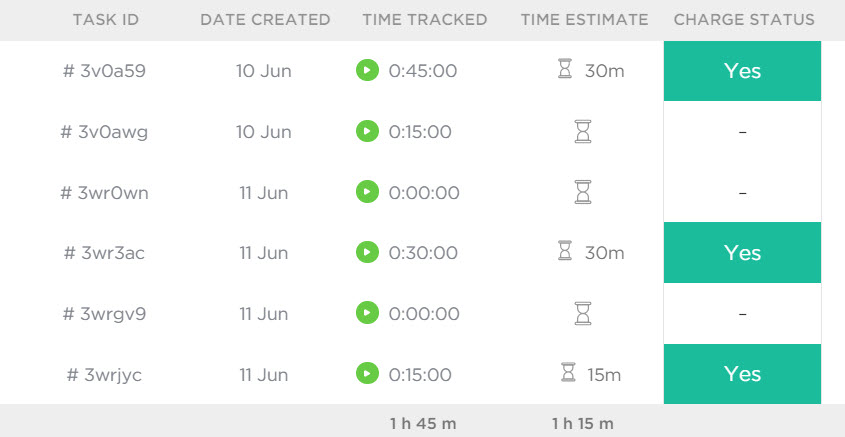
June 2011 – The minimum charge is 30 mins of $55.00 per 30 mins excl of GST. We have held labour costs since 2011. We can no longer hold this rate. December 2025 – The minimum charge will increase from $55.00 per 30 mins to $60.00 per 30 mins excl of GST as from December […]
What is 2FA and why do you need it?
Two Factor Authentication is known as 2FA. Why you need this extra layer of protection
Google Authenticator

This is only a suggestion from NZServers We suggest you carry out your own research Google Authenticator is free and available on Playstore and Apple Apps.
Authy 2FA

NZServers recommends Authy 2FA as there are better security controls. Any 2FA is better than none.
WordPress 2FA
It is your responsibility to set up 2FA for WordPress as the authentication techniques often rely on using an app on your cellphone which is outside the server environment. Please carry out your own research in what is best for you. Plugins like WordFence make the process easy. The video below will show you the […]
CPANEL 2FA Two Factor Authentication
2FA has been around for a while and now available for access to CPANEL You may have seen this with banking apps where a code is sent to your cellphone to authenticate that it is you making the request. 2FA is essential to protect your information from hackers. Now CPANEL allows 2FA which allows a […]
WordPress and Recaptcha V3 Issues

If you are using any form plugin which uses Google ReCatcha Vs 3 no longer uses the usual challenge option. Googles recaptcha V3 no longer requests people to click on the checkbox to say they are not a robot or ask other quiz type c=questions. There is no challenge questions to answer. Instead Google analyses […]
Dynamic IP address got you down?

Stop your IP being blocked by our server by using a Dynamic Host in conjunction with our server settings.
Changing PHP Versions

You change PHP versions by using your CPANEL or Control Panel Accessing CPANELYou can use https://sv5.nzhost.net.nz:2083/ or http://yourdomain.xxx/cpanel Under the software section find this icon called Select PHP version You can set the PHP version only for the entire domain The default version of PHP selected will show at the top – currently set at PHP 5.5 Suggest that […]
Scanner for IPADS/IPHONE

Evernote’s Scannable for iOS scans documents and business cards quickly Scannable works like other modern scanning apps such as Scanbot and CamScanner: simply point your device’s camera at a paper document and you’ll automatically get a clean scanned image without having to crop, rotate or adjust color. Once you’ve scanned a document, you can save […]